MCP Use Cases for Amazon Sellers: 11 Jobs to Hand Your AI | Inventory Hero
·9 min readOperations
MCP Use Cases for Amazon Sellers: 11 Jobs to Hand Your AI
The top MCP use cases for Amazon sellers: restock reviews, profit leak hunting, PO logging, quarterly planning, and business memory, with real workflows.
Matthew Kerns is a software engineer at Inventory Hero, where he builds the MCP server and AI-assistant integrations that let sellers work their live inventory, sales, and supplier data from Claude. He also runs his own Amazon FBA brand, so the workflows he writes about get tested on his own inventory first.
What are the most useful MCP use cases for Amazon FBA sellers?
The highest-value use cases are the restock review, stockout risk checks, a consolidated inventory position across FBA, AWD, and 3PL, profit ranking after Amazon fees, and logging suppliers and purchase orders in plain English. Rounding out the list: margin drift monitoring, data hygiene sweeps, spreadsheet import and export, and business memory that stores your operating rules for future answers.
Is it safe to give an AI assistant access to my Amazon business data through MCP?
Yes, when the connection is scoped correctly. The assistant reads your numbers through the Inventory Hero server, limited to your own account, and any edits it makes are non-destructive changes to your own records, things like product costs, lead times, suppliers, and purchase orders. It never touches your live Amazon listings, never deletes anything, and cannot place an order for you. Writes happen only when you ask, and the assistant reports back exactly what it recorded. Wherever money moves it drafts the purchase order and you place it, so a human stays in the loop.
Do I need to know how to code to use MCP as a seller?
No. Connecting a modern MCP server is a one-time setup: you paste a URL into your AI assistant's connector settings and sign in with your normal account login. After that, every use case is plain English. The coding already happened on the server side.
How is an MCP use case different from a ChatGPT prompt?
A prompt is an instruction to a model that has no access to your data, so the answer is generic advice or math on numbers you pasted in. An MCP use case runs against your live account: the assistant calls a tool, the server returns your real numbers scoped to your account, and the answer is grounded in your actual position. Same question, very different reliability.
Do I need a paid Claude plan to run these MCP use cases?
Yes. Connecting a custom MCP server in the Claude web and desktop apps needs a paid plan. The Inventory Hero side is a normal account with your Amazon data synced. Once both are in place you paste the server URL into Claude's connector settings, sign in with your usual login, and every use case is plain English. There is no per-use-case charge beyond your Claude plan and your Inventory Hero subscription.
Once your data is connected, the assistant stops giving generic advice and starts answering from your live account. That shift, from building reports to just asking, is conversational analytics applied to an FBA business. The top MCP use cases for Amazon sellers fall into four buckets:
Ordering decisions: what to reorder, what is about to run out, and your real position across FBA, AWD, and 3PL (use cases 1 to 3).
Profit leak hunting: which SKUs actually make money after fees, your single biggest fee lever, and margin drift before it becomes a write-off (4 to 6).
Data chores you can hand off: fixing missing costs and lead times, logging suppliers and POs in plain English, and bulk spreadsheet imports and exports (7 to 9).
This guide lists the eleven use cases we see working for FBA sellers today, with a
worked example for the ones that involve real math.
If you are new to the protocol itself, start with
MCP for Amazon sellers (what it is and how it
works) and the setup guide for connecting Claude.
This article assumes you are connected and asks a different question: what can
you actually use it for?
Use cases 1 to 3 replace the recurring spreadsheet shuffle. The value is not
that the assistant knows a formula (any chatbot does); it is that a grounded
assistant already has your velocity, lead times, incoming orders, and seasonality,
so the answer accounts for all of them at once.
A worked example. Say one SKU sells 18 units a day, your supplier needs 40 days,
and you hold a 15-day buffer, with 890 units on hand (FBA plus AWD) and a
600-unit PO landing in three weeks.
Your reorder point is 18 x (40 + 15) = 990 units (you can plug your own velocity and lead time into the restock calculator to see this for one of your SKUs). At 890 on hand you are
already below it, so a naive read says order today. But with the incoming 600
units logged (use case 8), your inventory position is 1,490 units, roughly 82
days of cover at 18 a day against the 55-day threshold. The honest answer is no
order today, with about four more weeks of runway before one is due. (Two
simplifications to note: AWD units sit off-site and arrive at FBA with a transfer
delay, so they are cover, not stock buyable today; and a production restock
engine runs a day-by-day projection with seasonality on top of this static
arithmetic, so treat the example as the shape of the logic, not the exact
output.)
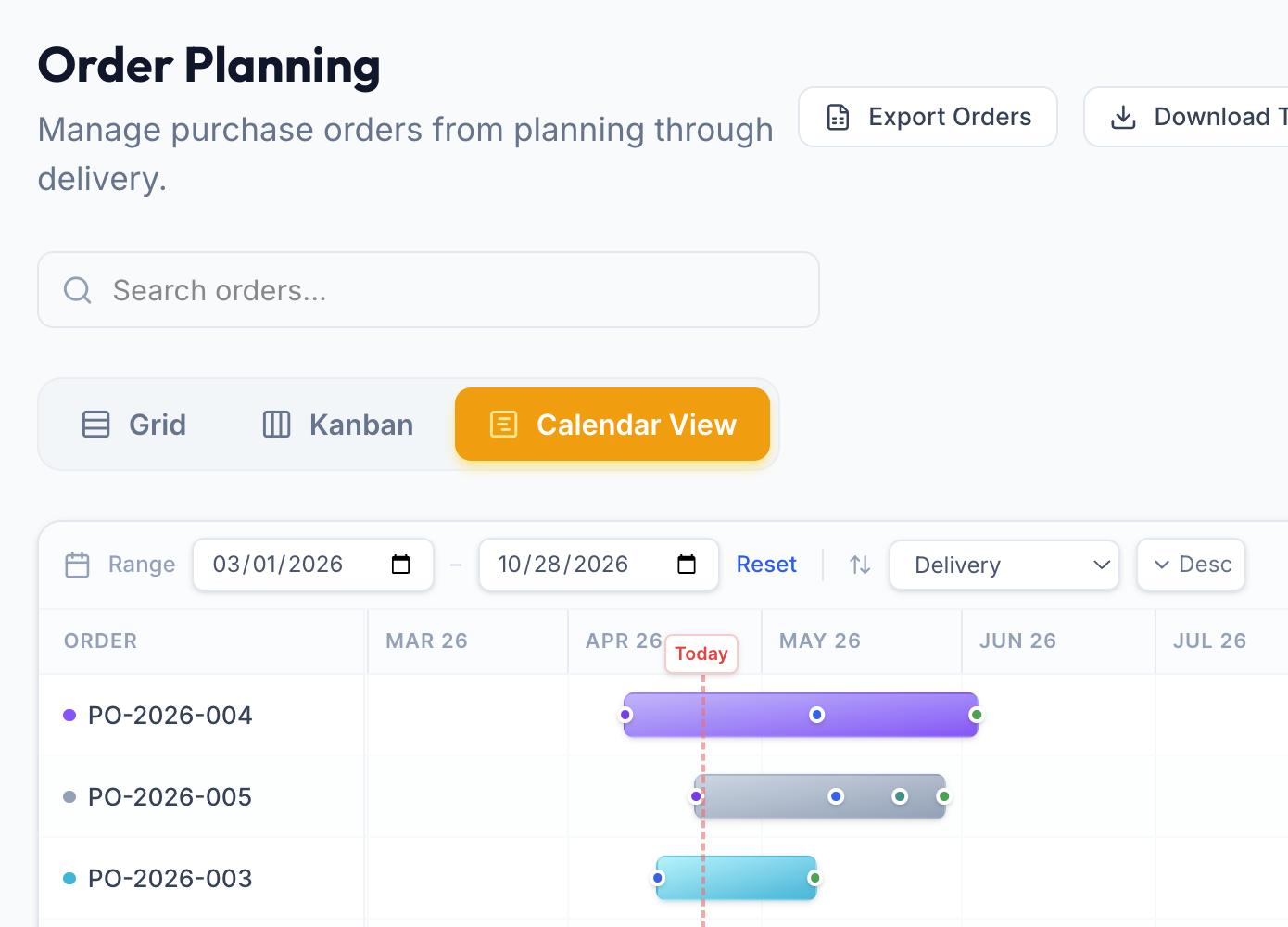
Inventory Hero's order planner lays your incoming POs on a timeline. Seeing what is already on the water is how you avoid double-ordering. (Illustrative account data.)
That interplay between velocity, lead time, and inbound stock is what a connected
assistant folds into a single answer when the server's restock math includes
incoming orders (Inventory Hero's does), and what a copy-pasted
ChatGPT prompt cannot do. For the
underlying method, see our
reorder date calculation guide.
Use cases 4 to 6 are where the surprises usually live. Before you trust any of
them, run the trust gate: ask which SKUs have missing or incomplete cost data. A
profit ranking over half-complete costs looks precise and is not.
Then hunt. The scorecard (use case 4) surfaces the mismatch between revenue rank
and profit rank: say a $19.99 SKU that sells briskly but nets under a dollar a
unit once referral1, fulfillment2, storage3, and
returns come out, sitting two rows above a slow sleeper with the best margin in
the catalog. To sanity-check one product's per-unit math before you trust the
ranking, run a single SKU through the FBA profit calculator.
Illustrative: a $19.99 SKU that nets $0.59 a unit. FBA fulfillment is the single biggest fee lever here.
The fee waterfall (use case 5) tells you which single line item is your biggest
lever, the same breakdown you can approximate for one ASIN in our
FBA fee calculator. The drift watch (use case 6)
catches margin erosion, the slow leak from a fee change or creeping ad spend,
while it is still a trend and not a quarter-end write-off.
The reason these answers are actionable is simple: the number in the chat matches
the number on your dashboard, because both come from the same pre-computed data
layer rather than fresh arithmetic on raw rows. Our
AI inventory management playbook covers that
tradeoff in depth.
The hygiene sweep (use case 7) finds the missing landed costs and lead times that
silently corrupt every downstream answer, and fixes them in the same conversation.
If you are not sure what a SKU's number should be, our
landed-cost calculator builds it up from unit
price, freight, duty, and prep.
PO logging (use case 8) is the least painful data entry in the stack: read the
invoice, dictate the order with its arrival window, done. And because the PO is
now in the system, the restock math stops telling you to reorder stock that is
already on the water. Import and export (use case 9) round it out: hand the
assistant a cost spreadsheet and it applies the updates in batches, or ask for
your open POs back as a file.
A note on safety, since these are write operations: a well-designed MCP server
keeps them non-destructive (nothing deleted, nothing touching your live Amazon
listings) and scoped to your own account on the server side. Writes happen only
when you ask for them, and the assistant reports back exactly what it recorded.
The safety checklist in MCP for Amazon sellers
covers this in depth.
Use case 10, business memory, is the quiet multiplier. Tell the assistant your
operating rules once: the supplier that shuts down for three weeks around Chinese
New Year, the 45-day cover floor on your bestsellers, the fact that your Q4 ramp
starts in September. It stores them in your account's
AI employee handbook and reads them back when a
future answer depends on them.
Be clear about the mechanism: the restock tool's math does not change. What
changes is the read on it. Without the rule, a restock review dates a January
order and moves on. With it, the assistant flags that the order-by date lands
inside the factory's dark window and tells you to move the order up, before the
shutdown. You said it once; it surfaces exactly when it matters. That is the
difference between a tool you operate and a colleague you brief, and it is the
bigger story in the AI employee for your FBA business.
Use case 11 is the composite of all four buckets, and the one that feels most
like working with a colleague. A quarterly planning session runs a loop: look
back (what did last quarter and the same quarter last year actually sell, and
what did stockouts cost), decide (which SKUs get how much cover, what launches,
what the order calendar looks like against lead times), and commit (store the
targets and rules, log the POs). Each step leans on the use cases above; the
assistant's job is holding the whole picture while you make the calls. We walk
through a real session, with the actual planning thread, in the
quarterly planning deep dive.
Two prerequisites: an Inventory Hero account with your Amazon data connected and
synced, and a Claude that can reach it (the
setup guide covers both; Claude on
web and desktop needs a paid plan). Then order matters, because the use cases
feed each other: inputs before rules, rules before rankings, POs before the first
restock review. We published a day-by-day sequence as its own guide,
your first week with Claude connected.
After that first week, the routine collapses into the standing restock review
that guide ends with.
Three places. First, anything that spends money: the assistant drafts the PO, you
place it. That draft-then-approve split is the supervised-agent pattern
that keeps AI useful without letting it commit your cash. Second, first-time answers: the first restock review deserves a
line-by-line check against your own judgment before you start trusting the
cadence. Third, unusual readings: if a number looks off, ask the assistant to show
the breakdown rather than accepting or dismissing it, since the components are
auditable all the way down.
MCP (an open standard introduced by Anthropic in late 2024, defined at
modelcontextprotocol.io) made these use cases
possible, but the discipline that makes them valuable is yours: verified inputs,
stored rules, and a steady rhythm. Start with the hygiene sweep, work down the
list, and by next week your
MCP use cases stop being demos and start
being how the business runs.