Free FBA tool
FBA Restock Calculator
Your numbers
Lead time (the FBA three-part chain)
Your review cycle. The order-up-to target covers your lead time plus this cadence, so ordering monthly buys more per order than ordering weekly.
Safety stock method
Reorder point
2,460 units
At 30 units/day you reach this level in about 18 days. That is when the PO goes out.
Suggested order qty
360 units
To reach your order-up-to target
Safety stock
600 units
20-day buffer
Total lead time
62 days
Production + freight + receiving
Days of cover
100 days
At current velocity
How the reorder point breaks down
- Lead time demand(30 units/day x 62 days)1,860 units
- Safety stock(20 day buffer)600 units
- Reorder point(Reorder when sellable stock falls to this level)2,460 units
Inventory Hero
Selling something seasonal?
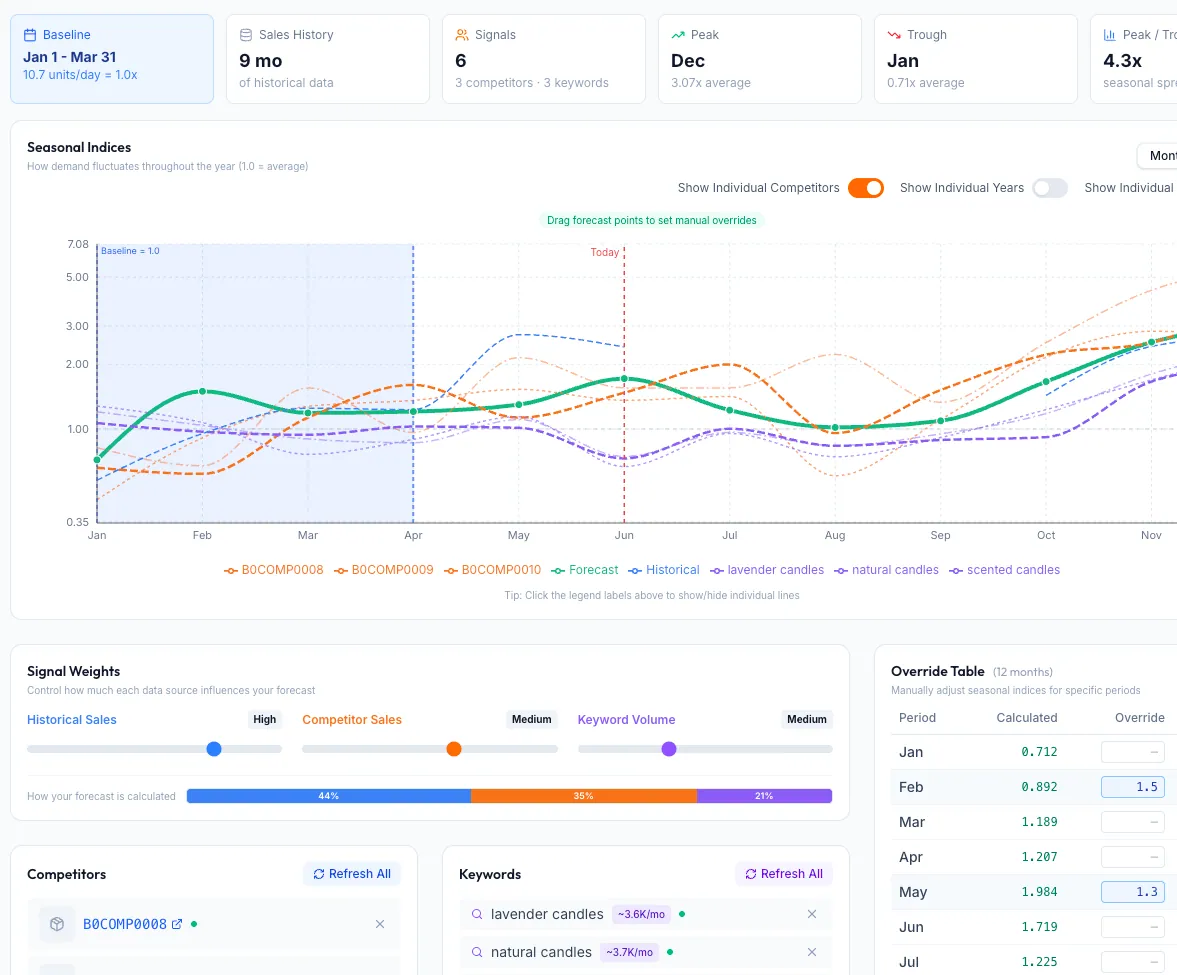
This calculator assumes steady sales. Real FBA demand is not flat, and a flat average in Q3 buys you a Q4 stockout. Inventory Hero builds your seasonal forecast from:
- Your own sales history, so the forecast fits your product
- Competitor velocity trends, so you see the spike coming
- Search demand curves, so you order for the season, not last year's average
No credit card required.
The formula behind the calculator
Reorder point
Reorder point = (average daily sales x total lead time) + safety stock
Total lead time = supplier production days + freight transit days + Amazon receive and check-in days
Suggested order quantity
Order qty = order-up-to level − units on hand − units inbound
Order-up-to level = average daily sales x (lead time + review period) + safety stock
Safety stock (simple)
Average daily sales x buffer days. A fast cushion when you do not track demand variability yet.
Safety stock (statistical)
z(service level) x daily demand standard deviation x square root of lead time. Sizes the buffer to how spiky your sales actually are.
Worked example
A SKU sells 30 units a day on a steady trend. The supplier needs 20 days to produce. Ocean freight plus drayage runs 35 days door to Amazon. Amazon then takes another 7 days on average to receive, scan, and make the shipment sellable. Total lead time is 62 days, not the 20 the supplier quoted.
- Lead-time demand: 30 units x 62 days = 1,860 units
- Safety stock (20-day buffer): 30 x 20 = 600 units
- Reorder point: 1,860 + 600 = 2,460 units
The moment sellable inventory hits 2,460 units, the PO goes out. A seller who used the 20-day supplier number alone would set a reorder point near 1,200 units and run out about six weeks before the next shipment cleared. That is the load-bearing reason to use real lead times. For the math in prose, see the reorder point guide; for sizing the buffer, the safety stock guide.
Key terms
- Reorder point
- The on-hand inventory level that should trigger a new purchase order. Below it, you risk stocking out before the next shipment is sellable.
- Safety stock
- The buffer you hold on top of expected lead-time demand to absorb sales spikes and lead-time slippage without going to zero.
- Days of cover
- How long your current on-hand stock lasts at your average sales rate. Falling days of cover is the early warning that a reorder is due. In 2026, Amazon also charges a low-inventory-level fee when your historical days of supply sit below about 28 days, so keep your reorder point and safety stock above that floor. More in the reorder point guide.
Frequently asked questions
How do you calculate an FBA restock quantity?
Start from your reorder point: average daily sales times total lead time, plus safety stock. When sellable stock hits that level, order enough to reach your order-up-to target, which covers the next lead time plus your review cycle plus safety stock, minus what you already have on hand and inbound. This calculator does all of that live as you type.
What is the reorder point formula for Amazon FBA?
Reorder point equals (average daily units sold times total lead time in days) plus safety stock. For FBA, total lead time is supplier production plus freight transit plus Amazon receiving and check-in, which in 2026 commonly runs far longer than the supplier quote alone.
Should Amazon receiving time count toward lead time?
Yes. Units sitting in transit or in Amazon's receive queue are not sellable and do not protect your rank. Measure your real check-in time from recent shipments and add it to every restock calculation. It is routinely one to three weeks and the most underestimated input.
How much safety stock should I hold?
Two ways. The simple method holds a fixed buffer of days of demand. The statistical method sizes the buffer from your demand variability and a target service level, using z times daily demand standard deviation times the square root of lead time. Steadier sales need less buffer; spiky demand needs more. This version models demand variability only, not lead-time variability, so if your Amazon receiving time swings a lot, widen the buffer to compensate.
Does this restock calculator account for seasonality?
No. It assumes a steady average daily sales rate. For a seasonal product, set the average daily sales input to the run rate of the period you are buying for, not a flat annual average (for example, your expected Q4 daily rate when you order for Q4, not your summer pace). To forecast seasonal spikes automatically from your product's sales history, comparable competitor products, and keyword demand, use Inventory Hero.
Is this restock calculator free and can I embed it?
Yes. The calculator is free, runs entirely on the numbers you type, and stores nothing. You can embed it on your own site or blog with the iframe snippet near the bottom of the page.
Inventory Hero
Stop recalculating restocks by hand
Inventory Hero tracks your real sales velocity and actual lead times, including Amazon receiving, then tells you exactly how many units to order and when. No spreadsheet at 2am.
30-day free trialNo credit card required.
Embed this calculator
Free to use on your own site or blog. Paste this snippet where you want the calculator to appear. It keeps a small credit link back to Inventory Hero.
<iframe src="https://www.inventoryhero.ai/embed/fba-restock-calculator?utm_source=embed&utm_medium=iframe" title="FBA Restock Calculator by Inventory Hero" width="100%" height="720" style="border:1px solid #e5e5e5;border-radius:16px;max-width:680px" loading="lazy"></iframe>
<p style="font:13px/1.5 system-ui,sans-serif;text-align:center;margin:8px 0 0"><a href="https://www.inventoryhero.ai/tools/fba-restock-calculator">FBA Restock Calculator</a> by Inventory Hero</p>See all our free Amazon FBA calculators.