Run a quarterly planning session with your AI assistant
1
Pull the look-back
Ask for last quarter's sales by month, the same quarter last year, and stockout days, so you plan from what actually happened rather than what you remember.
2
Set planned velocity per SKU
Apply your seasonal ramp to the baseline. Sanity-check the multiplier against last year rather than guessing.
3
Derive the order calendar
For each SKU, work back from the quarter's ramp using lead time plus buffer to get the last safe order date.
4
Frequently Asked Questions
How do I plan inventory for the next quarter on Amazon?
Run three moves. Look back: pull last quarter's sales, the same quarter last year, and the days you were out of stock. Decide: set per-SKU cover targets from planned velocity, apply your seasonal ramp, and derive the last safe order date for each SKU from its lead time. Commit: place or schedule the POs and record the targets somewhere your weekly review will check against them.
Can an AI assistant do quarterly planning for my FBA business?
It can run the mechanics: pull the look-back numbers from your live account, apply seasonality and lead times, draft the order calendar, and store the plan. The judgment calls stay yours: how much cash to commit, which launches to bet on, and how aggressive to be on the ramp. Think of it as an analyst who holds the whole picture while you make the calls.
Matthew Kerns is a software engineer at Inventory Hero, where he builds the MCP server and AI-assistant integrations that let sellers work their live inventory, sales, and supplier data from Claude. He also runs his own Amazon FBA brand, so the workflows he writes about get tested on his own inventory first.
Check the draft orders against your budget, MOQs, and capacity limits, and cut or stagger where the plan exceeds them.
5
Commit the plan
Log the POs, store the quarter's targets and rules in business memory, and let your weekly reviews check reality against the plan.
How far ahead should Amazon sellers place quarterly orders?
Work backwards from lead time plus a buffer. If a supplier needs 50 days and you hold a 10-day buffer, stock for a quarter that ramps October 1 must be ordered by early August. As a rule, plan a full lead time plus buffer ahead of the quarter's demand ramp, and earlier if the window collides with supplier shutdowns like Chinese New Year.
It's a Tuesday in July, and your best seller just moved 24 units, the same as
yesterday, a calm number. But the calendar is quietly screaming. Peak is 90 days
out, your factory needs 50 to build and ship, and if you run the math backward,
the order that protects your whole Q4 has to leave your hands in about three
weeks. Miss that window and October decides your year without you.
That decision, and the dozen like it across your catalog, is Amazon FBA
quarterly planning: the quarterly pass of your
demand planning rhythm, where you look back at
what last quarter and the same quarter last year actually did, decide the coming
quarter's cover targets and order calendar, and commit the plan. Done by hand it
is an afternoon of report pulls and spreadsheet reconciliation. Done with an AI
assistant connected to your live data over MCP, it is one thread: you ask, the
numbers arrive already assembled, and you spend the session making decisions
instead of gathering inputs.
This article walks that session end to end, and here is the whole quarter at a
glance before we run it. It builds on the
MCP use-cases guide (quarterly
planning is use case 11 there) and assumes your data is connected and verified,
per your first week with Claude.
One planning session in July sets the orders that land before the ramp; a standing weekly review keeps the plan honest through peak.
"Show me unit sales by month for last quarter, and for the year-ago quarter."
"How many stockout days did I have last quarter, and on which products?"
"Which products made money last quarter, and which lost it?"
The stockout question is the one most sellers skip and should not: days at zero
are demand your history undercounts, so a look-back that ignores them will
quietly plan you into the same stockouts again (the mechanics are in
calculating lost sales). The profit question
decides which SKUs deserve aggressive cover at all: funding a full ramp on a
low-margin SKU is how Q4 cash crunches start.
The profit and stockout numbers come in rolling windows (30, 90, and 365 days,
not a calendar quarter to the day), so the year-over-year read leans on the
365-day window and the session runs cleanest near quarter end. And the
month-by-month view is the assistant rolling up daily numbers for you, not a
native monthly report.
Take the SKU from the top, the 24-a-day best seller, now planning the
October-to-December quarter in July:
Input
Value
Baseline velocity (last 90 days)
24 units/day
Last year's Q4 ramp
~1.5x baseline
Planned Q4 velocity
36 units/day
Supplier lead time
50 days
Buffer
10 days
Back-plan from the October ramp and the order-by date falls out of the math:
Working backwards from the rampThe order date is the ramp date minus lead time plus buffer.
Buffer sizing is the judgment the arithmetic hides: 10 days here, more for
volatile SKUs or unreliable suppliers. The assistant can run this same back-plan
across the catalog and draft a dated order calendar, longest lead times first. Treat
that draft as the planning view, and pull the live order-by dates from the
restock recommendations when you commit, since those apply your account's real
seasonality history. (How to build the seasonal multiplier itself is its own
topic; see the Q4 forecasting guide and
Amazon sales seasonality.)
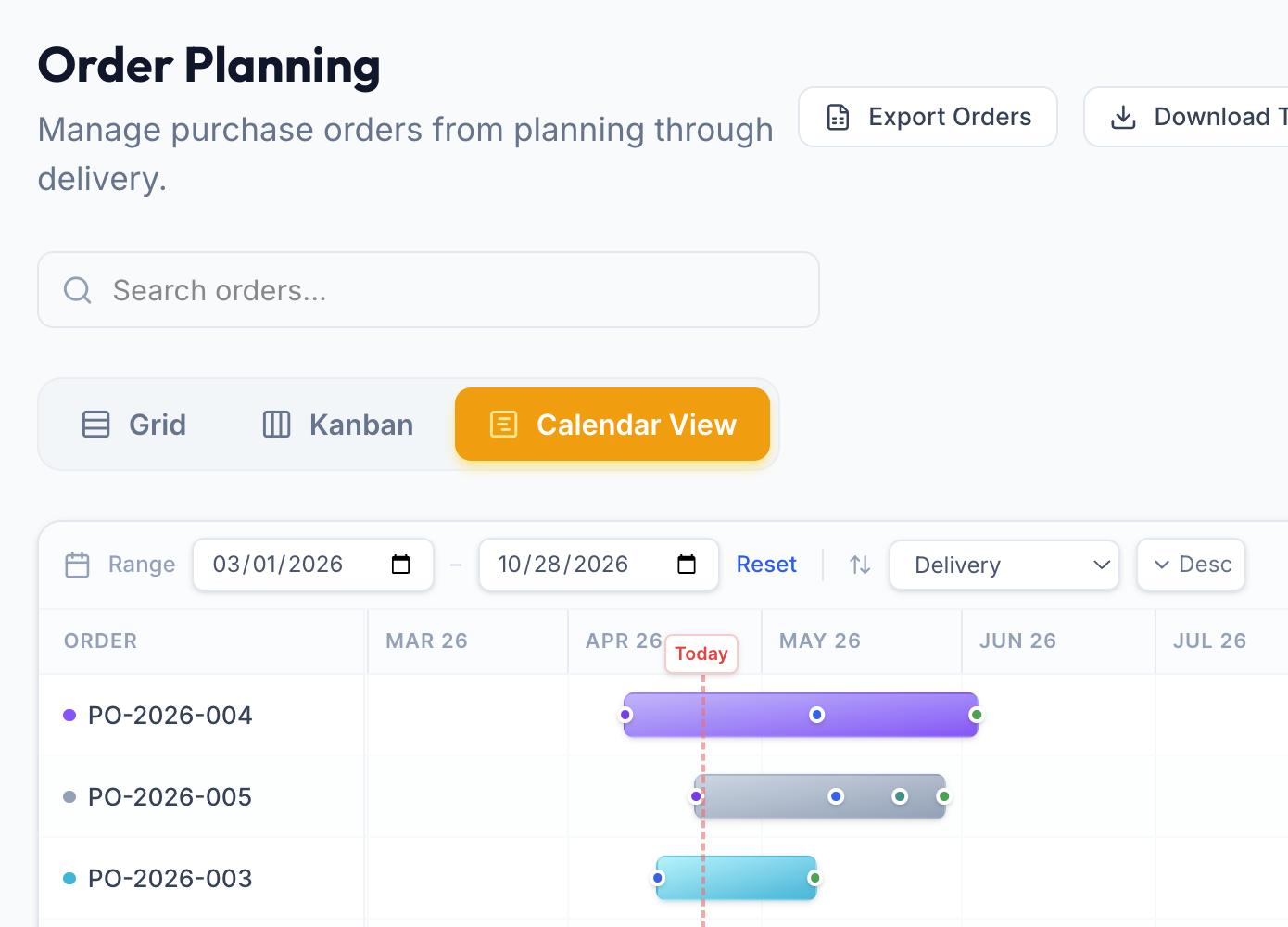
The back-plan, realized: every SKU's order laid on one timeline, longest lead times first, so the whole quarter's order calendar is visible at a glance. (Illustrative account data.)
New launches slot into the same calendar: a product you want selling in
November needs its first PO around early September by the same math. With no
sales history, the quantity is the judgment call: size it from an analog SKU's
first quarter or a capped test buy, not from a forecast you do not have.
Then reconcile before anything gets placed:
"Total the draft orders. My quarter's inventory budget is $40,000; if we
are over, what do I stagger or cut?"
The assistant totals the plan; the cuts are yours, lowest-margin SKUs first,
with the open-to-buy discipline as the budget rail. Two
constraints override the computed quantities: supplier MOQs (when the minimum
exceeds the plan, the overage becomes early cover for next quarter, or the SKU
sits this one out) and Amazon capacity limits on what you can send in.
The assistant is the analyst in the room: it pulls every look-back number from
your live account, applies lead times and your stored seasonal patterns, drafts
the order calendar, and keeps the whole catalog in view while you focus on one
SKU at a time. A spreadsheet does one SKU at a time and goes stale the day you
close it; the assistant holds every SKU's velocity, lead time, seasonality, and
inbound stock at once, and re-runs the whole back-plan the moment you ask. What
stays yours: how much cash to commit, which launches to
bet on, how aggressive the ramp multiplier should be, and which low-margin SKUs
get cut from the plan rather than funded.
A plan that lives in the chat scroll is a plan you will not follow. Close the
session with three commits:
Log the POs you decided on, with arrival windows, so the restock math sees
them immediately.
Store the targets and rules in business memory (where the assistant keeps
your plan so next quarter it remembers what you decided): "Q4 planned velocity
on ABC-123 is 36 a day" and "order by early August ahead of the October ramp."
Future conversations pick them up when an answer depends on them.
Let the weekly review carry it. The standing Monday prompt from
your first week now has a written
plan to check against: ask it to compare the week's numbers to the quarter's
targets, and the gap between the two is next quarter's first look-back
question.
Quarterly planning does not need to be a project. Three moves, one thread, and
the discipline of committing what you decided: that is Amazon FBA quarterly
planning with an assistant that already knows your numbers.